 Juris
JurisBuilt in trial.
For trial lawyers.
JurisOS wasn't designed in a conference room. It was built the night before jury selection — and refined in the courtroom.
The Founder
Matthew Loker is a trial attorney and the founder of Loker Law, APC, a California consumer-protection firm. He represents individuals against banks, debt collectors, and credit reporting agencies in state and federal courts, trying cases under statutes like the Fair Credit Reporting Act and the Electronic Fund Transfer Act.
He is also the kind of lawyer who automates everything he can — pleadings, discovery, exhibit covers — so that trial time goes to strategy, not paperwork. JurisOS is the courtroom-facing product of that obsession.
Why JurisOS Exists
Trial moves faster than paper. Panelists rotate through the box while you juggle questionnaires, seating charts, and strike counts; exhibits fly at witnesses while you track objections, rulings, and what actually made it into evidence — traditionally on sticky notes and legal pads. Miss one detail and you burn a peremptory you needed, waive an objection on appeal, or lose the quote your closing was built on.
Preparing for his own jury trial, Matt built a live dashboard instead. Jury selection worked so well on it that the exhibit side of trial got the same treatment — and the lawyers trying cases on those two asked for the rest. Those dashboards became JurisOS — the trial operating system.
The Plan preps your trial week. The Box runs your jury selection. The Record runs your exhibits. The Charge runs your jury instructions. The Verdict maps your proof to the verdict form. One screen each, all built for counsel table, and on matters running more than one, a single click switches between them — one site, not five.
The Pyramid
Five products, stacked the way a trial is built: plan the week at the base, then climb — pick the jury, put on the evidence, settle the instructions, and argue the verdict form at the apex. Every level feeds the one above it, on one thread of data. Click a level to jump to it.
The Philosophy
Software for trial lawyers should work the way trial works: offline-capable, zero learning curve at counsel table, and priced per trial — not as a subscription you pay for twelve months a year to use one week of it.
The Plan.
Every witness. Every minute. Before day one.
The Plan is JurisOS's trial-prep board — the base of the pyramid. Your trial week as a living calendar, and every witness mapped to the exhibits they sponsor, the instructions they feed, and the verdict questions they prove — before you ever pick a jury. All case data below is fictional.
Your Trial Week, As A Calendar
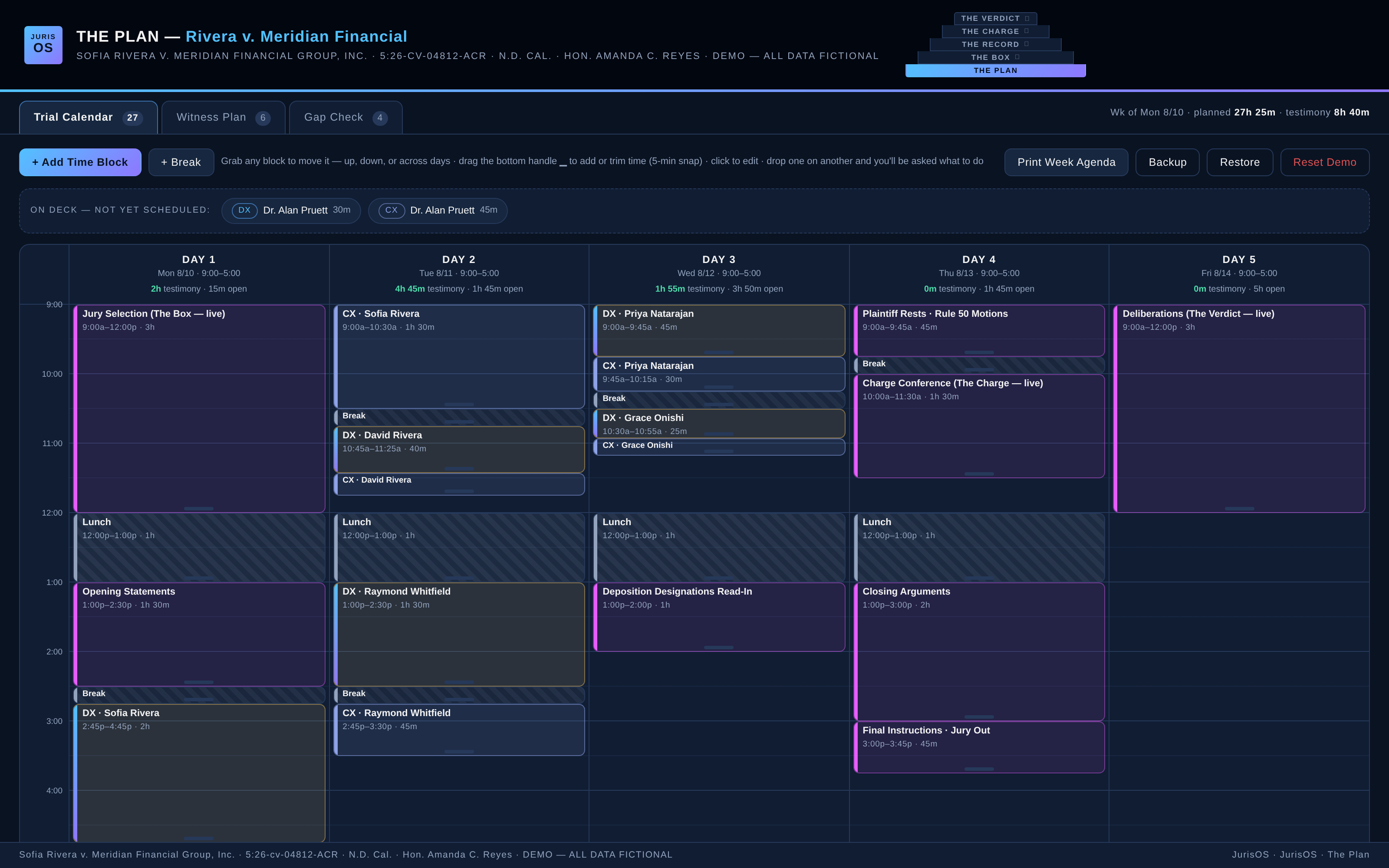
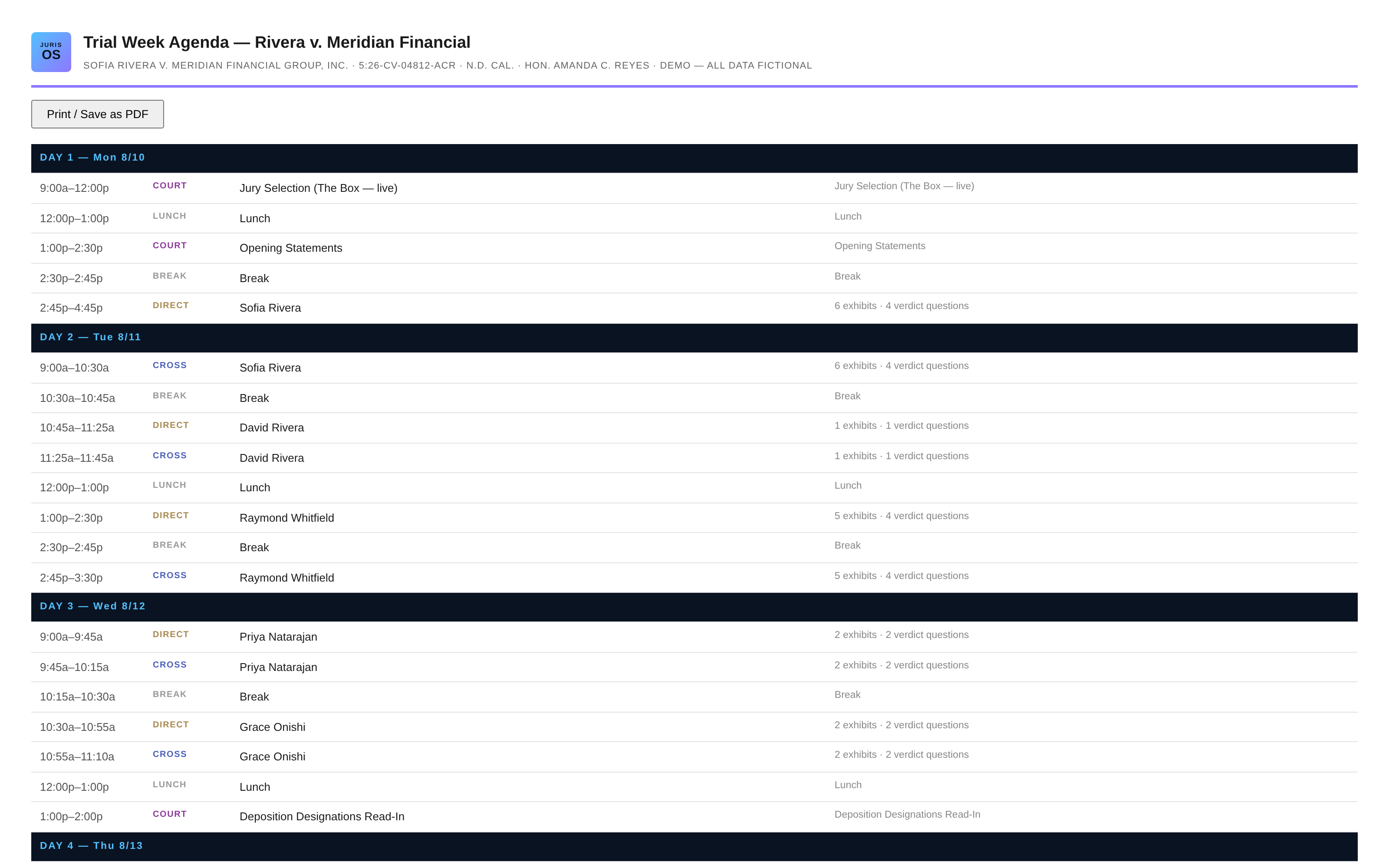
Monday through Friday, 9:00 to 5:00 — configured to your judge's actual trial hours. Jury selection, openings, every direct and cross, breaks, the charge conference, closings: each one a block you drag across days and stretch in 5-minute snaps. Per-day totals show testimony planned against court time still open, and the On Deck bench holds every examination that doesn't have a seat yet. Drop a block on another and The Plan asks what to do: make room (everything ripples later), allow the overlap, or undo.
Every Witness, Fully Mapped
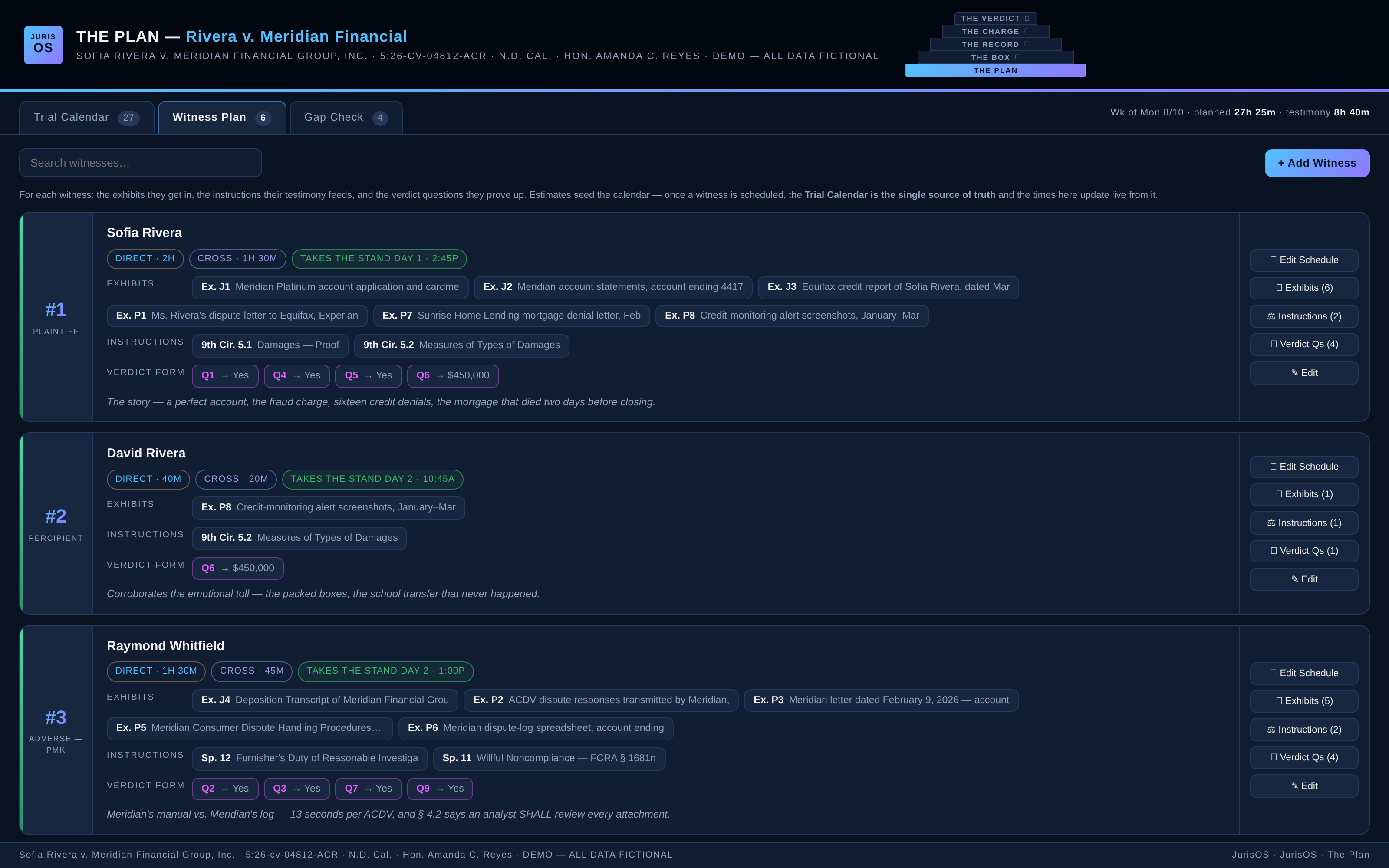
Each witness gets a card: role, estimated direct and cross, and — this is the point — the exhibits they sponsor, the instructions their testimony feeds, and the verdict questions they prove up. The exhibit list comes straight from The Record's build, the instructions from The Charge, the verdict questions from The Verdict — one thread of data, from the first witness you plan to the last question the jury answers. Call order and stand times compute live from the calendar.
One Source Of Truth
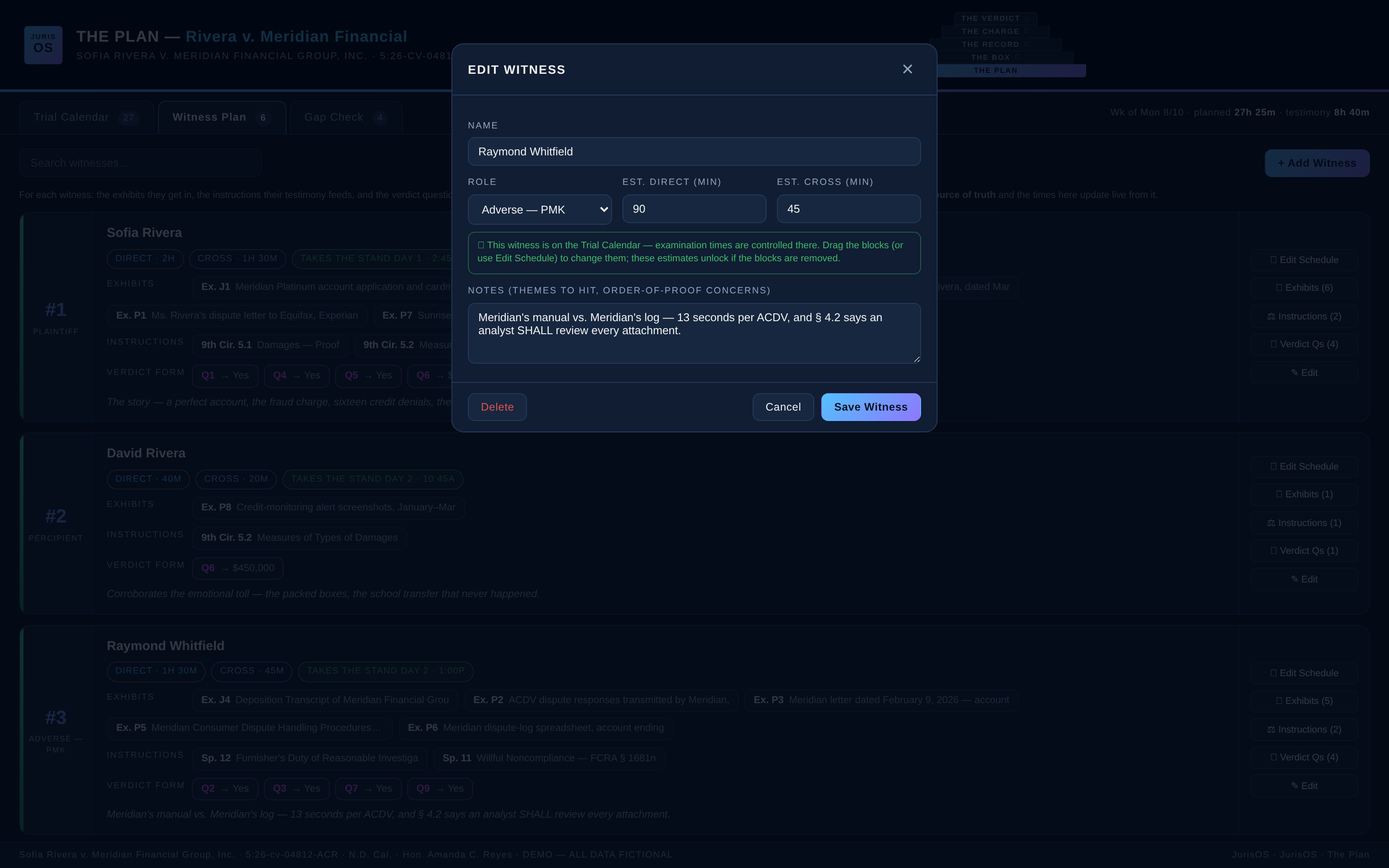
Estimates seed the calendar — but the moment a witness is scheduled, the calendar controls. The witness card shows live block totals, the edit dialog locks the time fields with a note that the calendar owns them, and the Schedule button opens the existing blocks instead of quietly creating duplicates. Your plan can't drift out of sync with itself the week before trial.
Gap Check — The Pre-Trial Gut Check
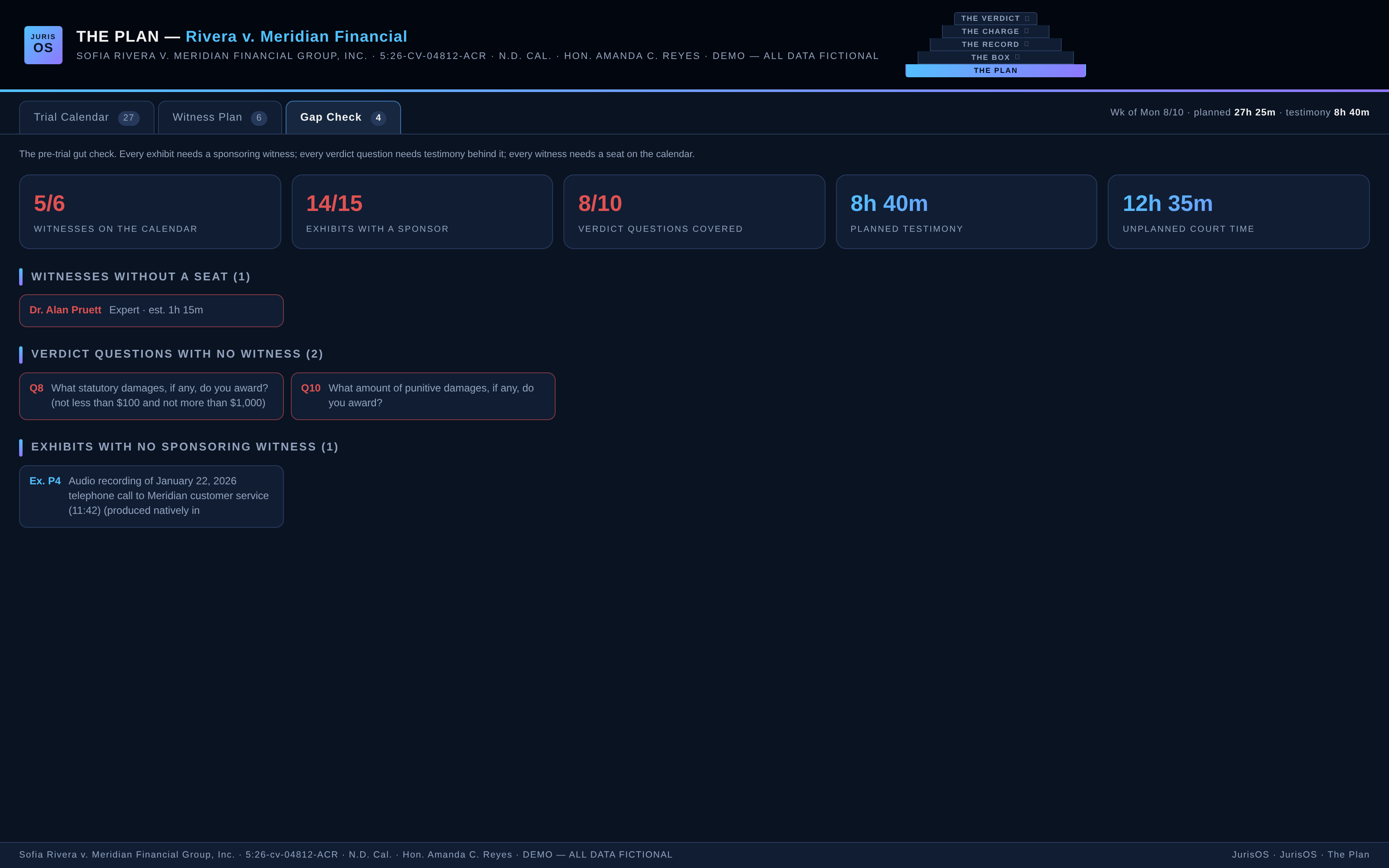
Before the first juror walks in, The Plan audits the whole case in one screen: witnesses without a seat on the calendar, verdict questions with no testimony behind them, exhibits with no sponsoring witness, and how your planned testimony stacks against the court time you actually have. Find the holes before the jury does.
The Week Agenda, Printed
One click prints the branded week agenda — day by day, block by block, with each witness's exhibit and verdict-question counts riding along. Hand it to co-counsel, your client, or the court clerk who wants to know how long your case will take. Print it or save it as a PDF.
The Box.
Every seat. Every strike. Time-stamped.
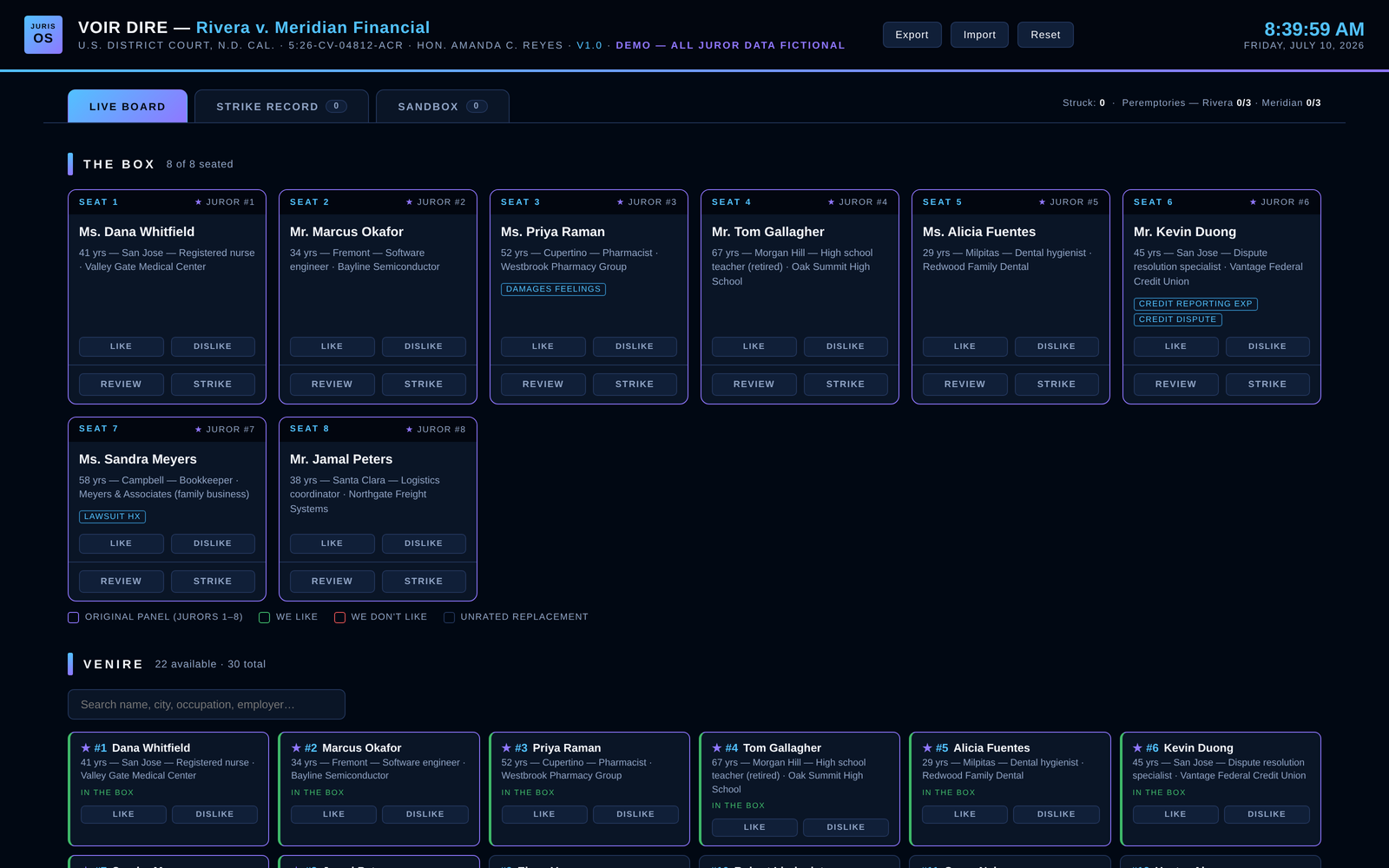
The Box is JurisOS's voir dire dashboard: the venire on cards, the box laid out the way your courtroom is, and every challenge preserved with its grounds and authority. All juror data below is fictional.
Questionnaire Mode
When the court gives you juror questionnaires, The Box turns them into searchable juror cards — age, city, occupation, employer, and issue tags (prior lawsuits, damages feelings, subject-matter experience) surfaced right on the card. Click any juror to review their full questionnaire answers without touching a binder.
Live-Capture Mode
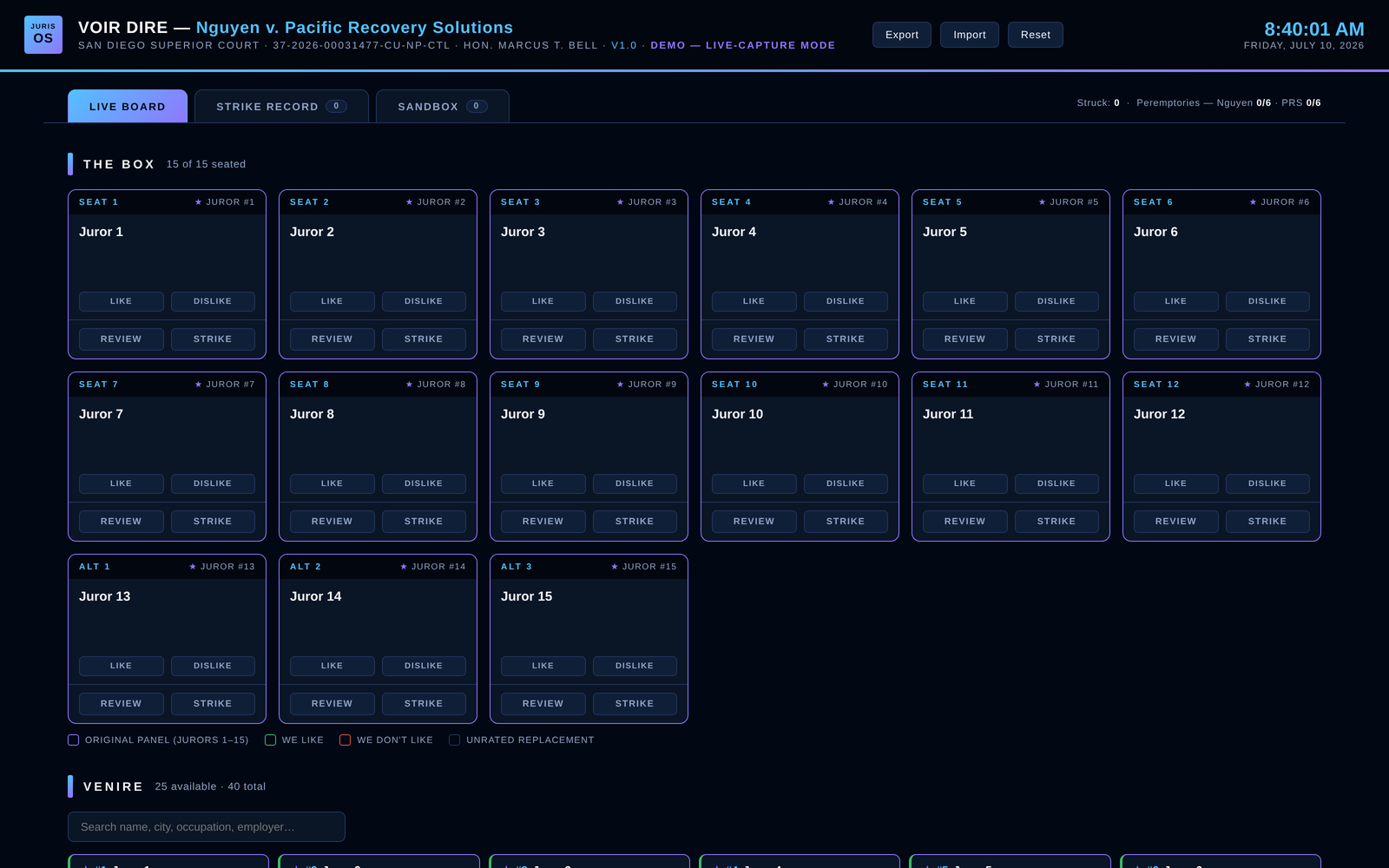
No questionnaires in your courtroom? Live-capture mode gives you blank juror cards you fill in at counsel table as the panel answers — name, background, and your notes, captured in seconds while voir dire moves. The box, the venire, and your strike counts stay live the entire time.
Rate The Panel As It Moves
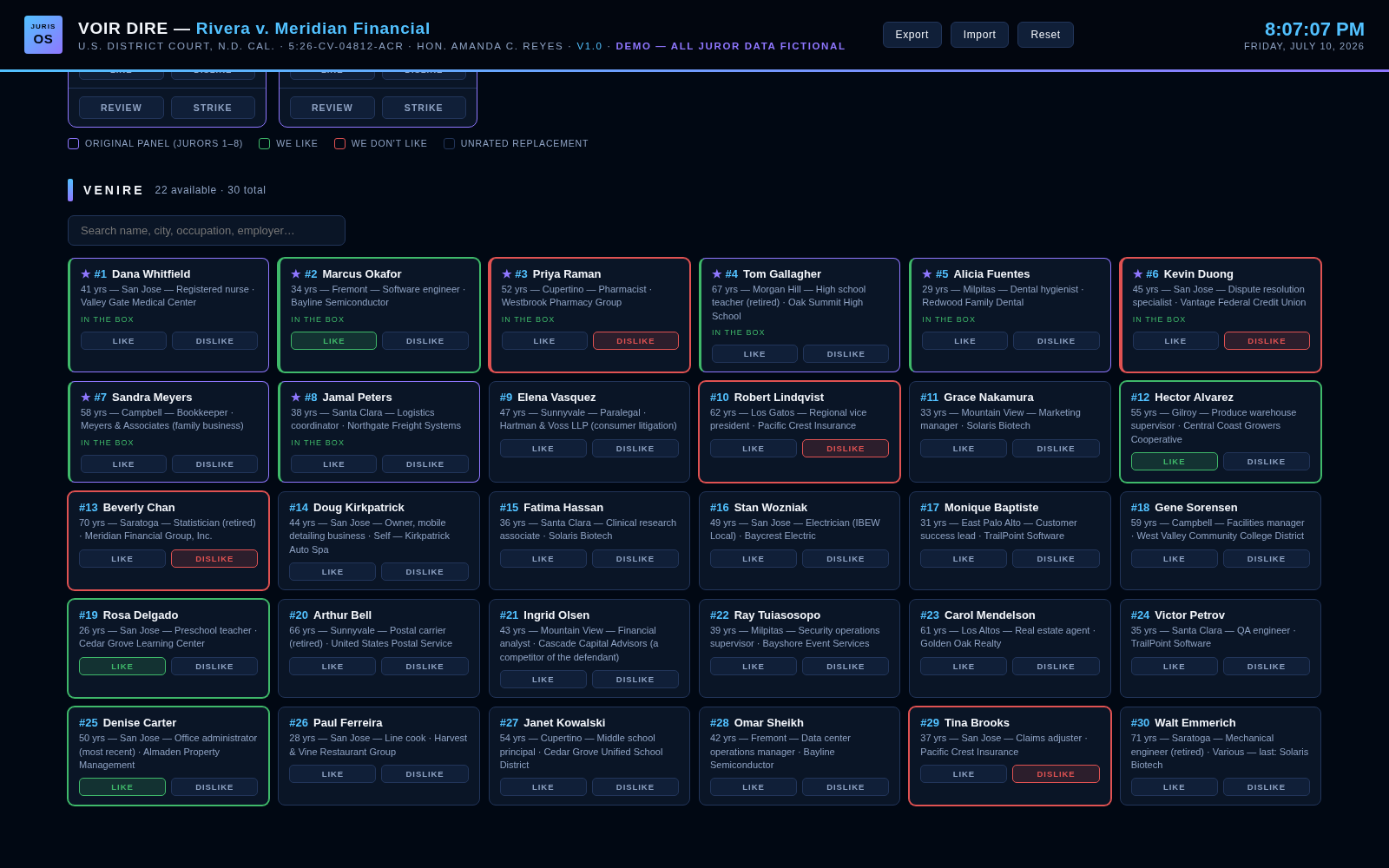
Every juror carries a −5 to +5 star rating, and the card border color-codes instantly — green for keeps, red for targets — across the box and the entire venire. When panelists rotate into the box, you already know how you feel about who's coming.
Juror Review, One Click Deep
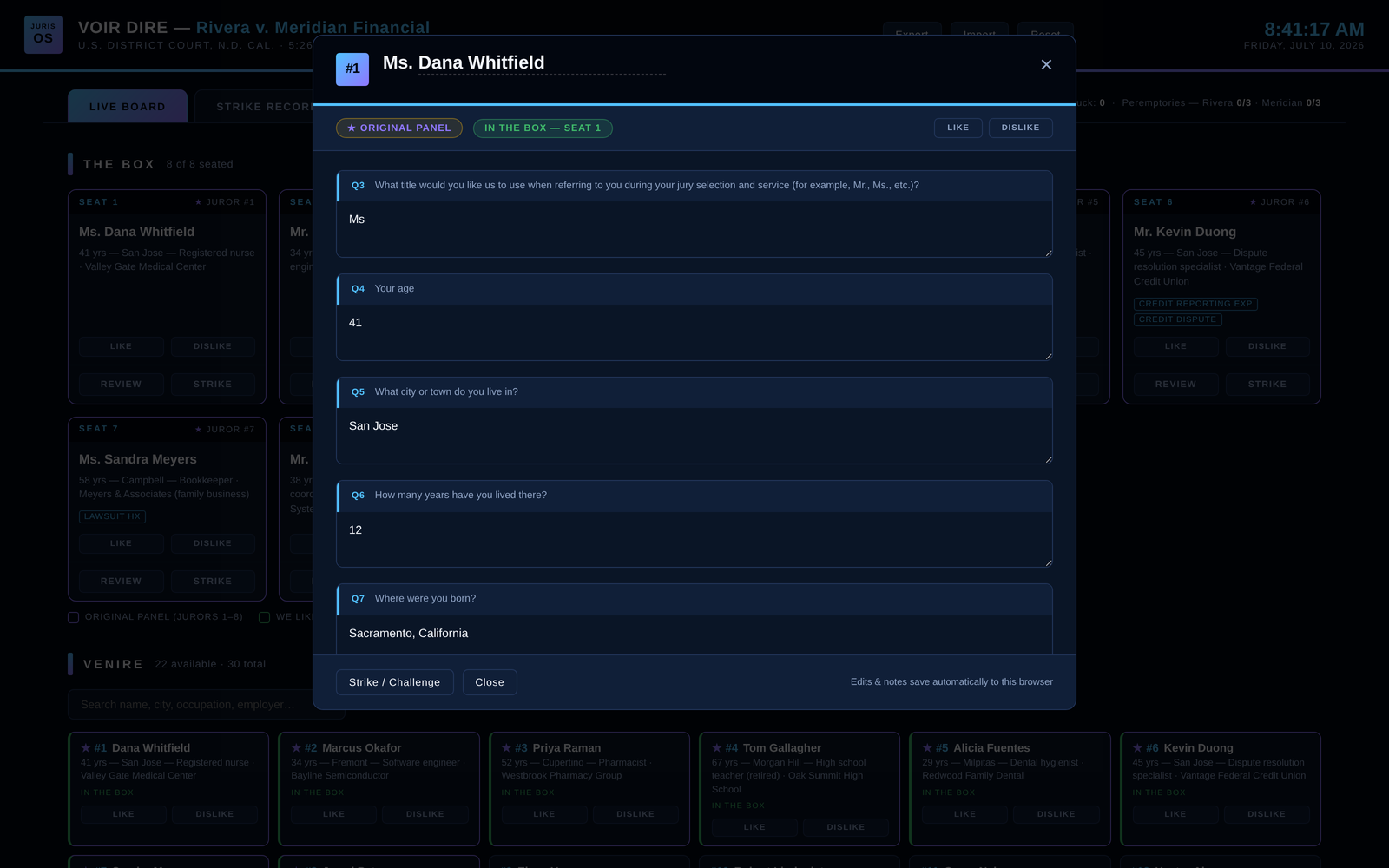
Click any card and the full questionnaire opens in place — every answer, plus your rating and a strike/challenge button right in the modal. Edits and notes save automatically; nothing leaves your machine.
Record A Challenge In Seconds
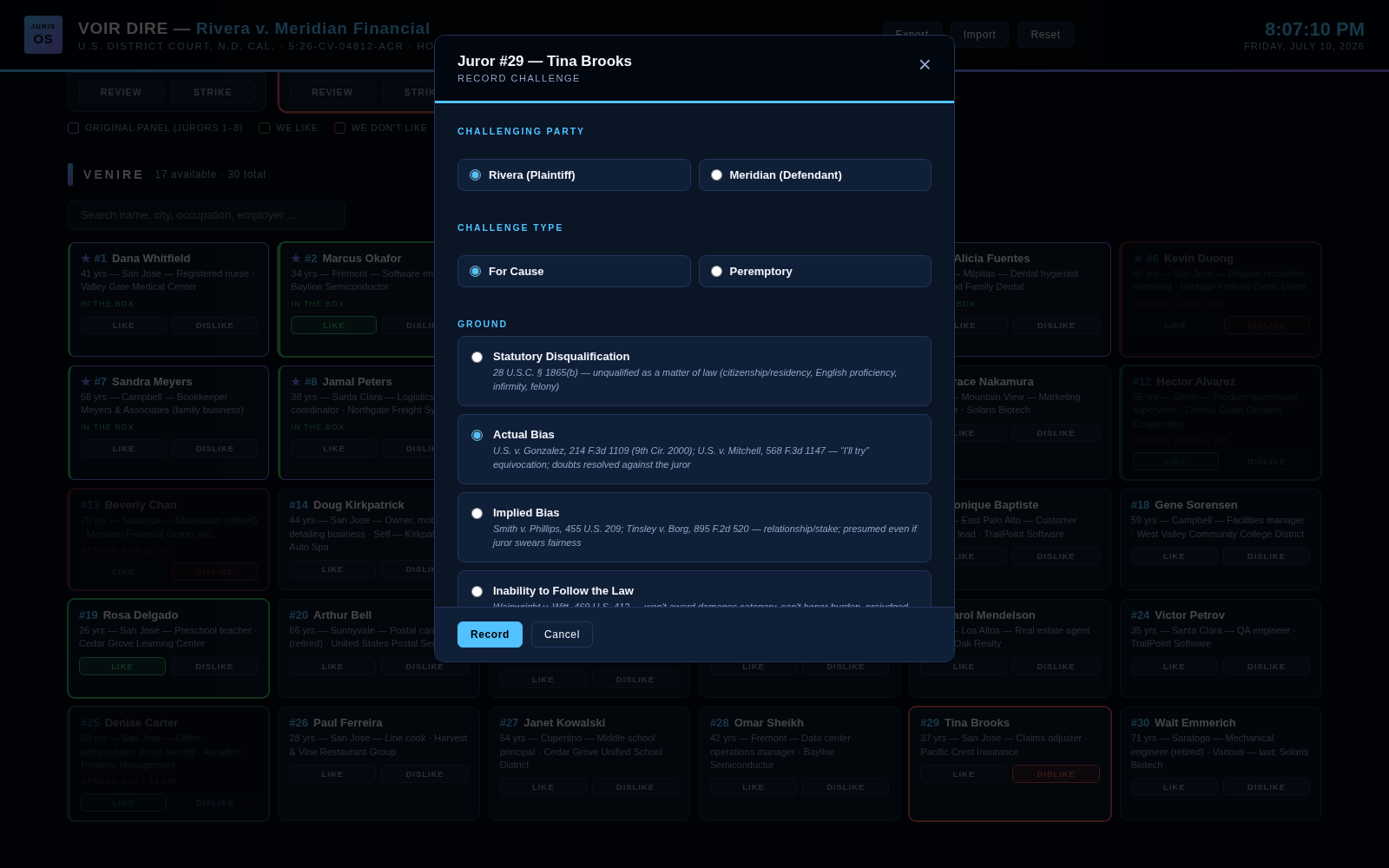
When you move to strike, the challenge dialog captures everything the record needs: challenging party, for-cause ground or peremptory, the court's ruling, the time to the second, and your basis — with the controlling authority for each ground printed right on the option. Say it to the judge, click it, done.
Challenge Authority, Built In
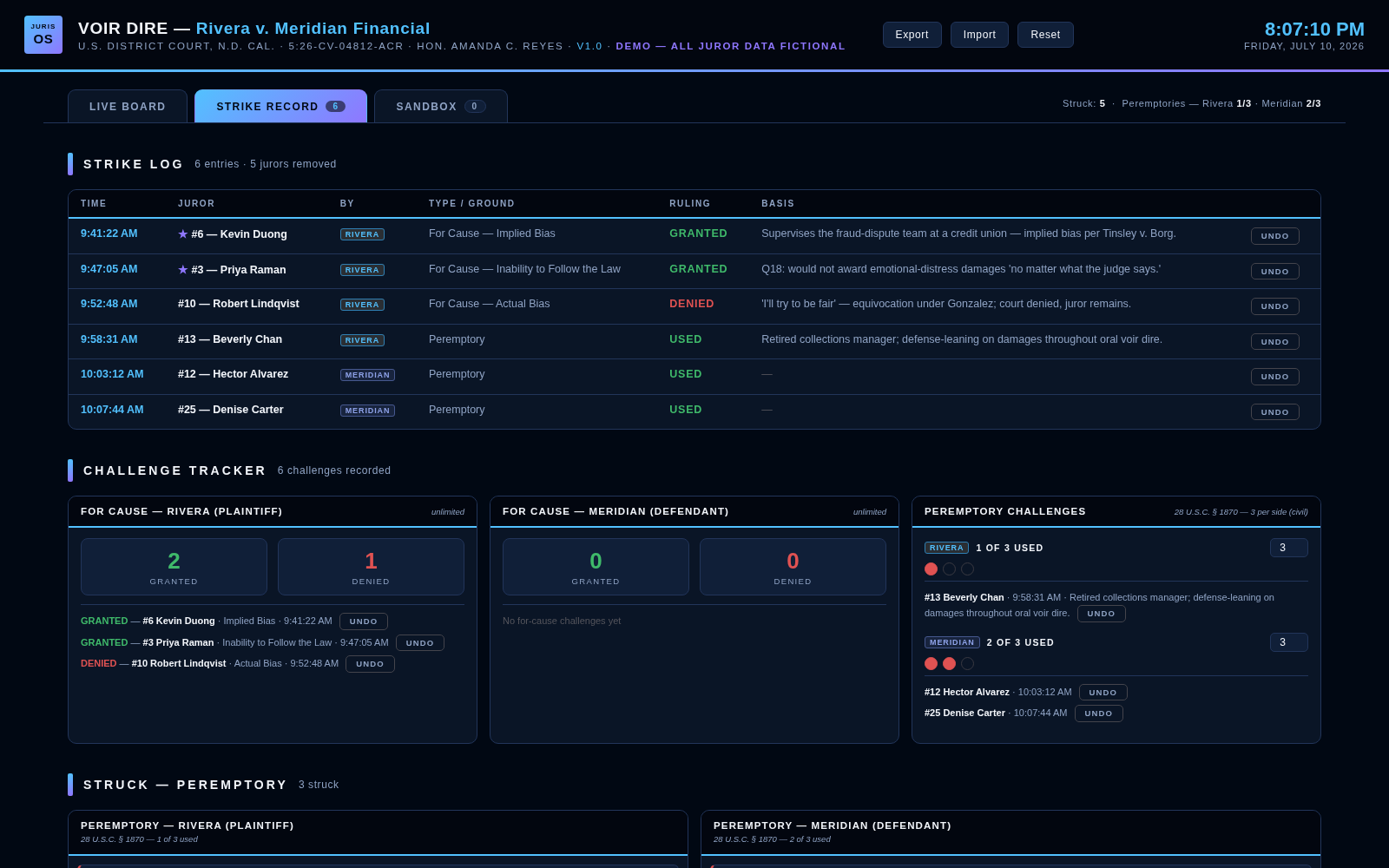
Every strike lands in a time-stamped log, attributed to a party, tracked as granted or denied, with peremptories counted down per side. The tracker cites the controlling authority for your jurisdiction — 28 U.S.C. §§ 1865 & 1870 and the federal for-cause case law in federal court, CCP §§ 225–231 in California state court — so when the judge asks for your grounds, they're already on screen.
The Strike Sandbox
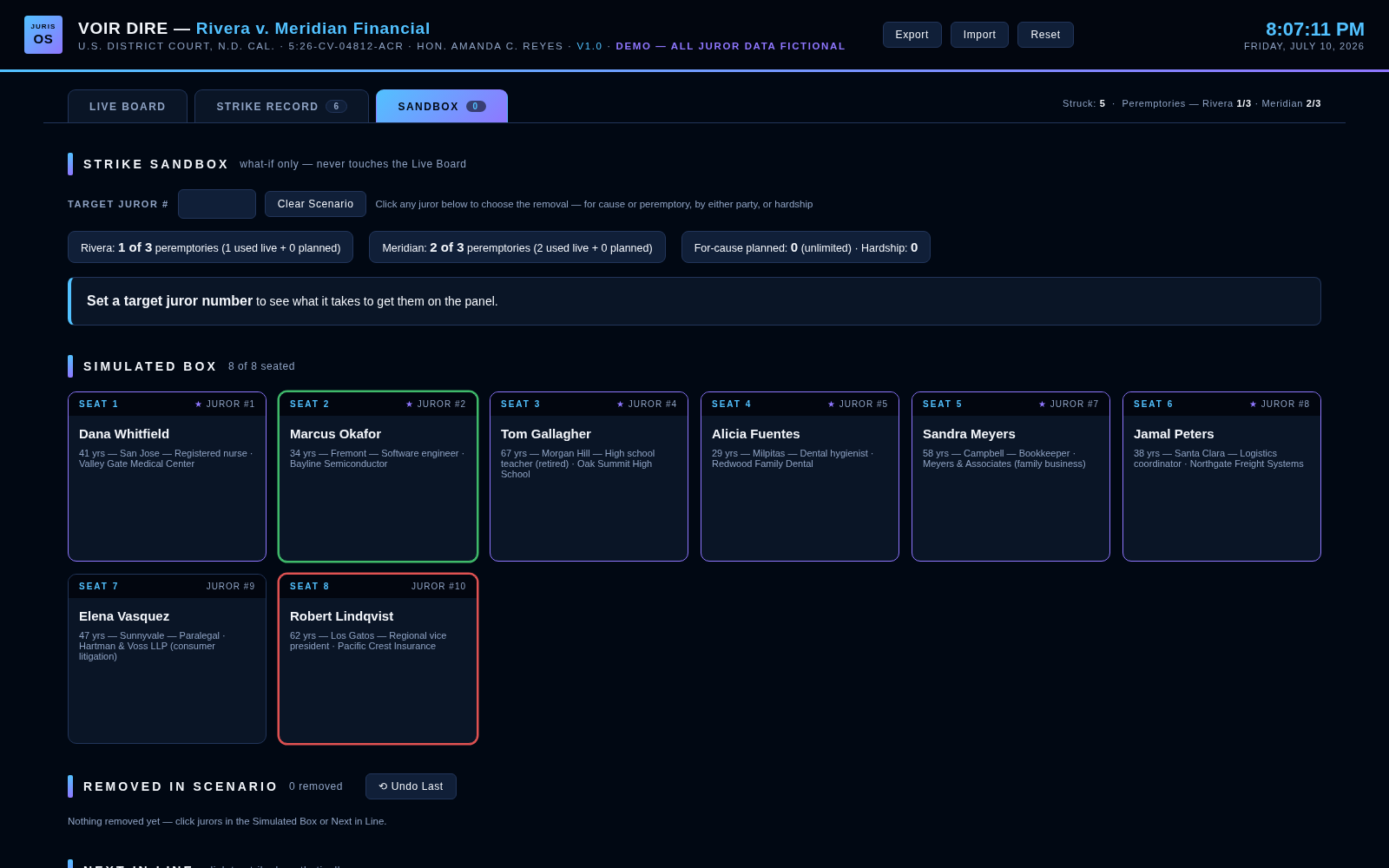
Before you burn a peremptory, game it out. The sandbox simulates removals — for cause or peremptory, by either party — and shows you who rotates into the box next, without ever touching the live board. Set a target juror and see exactly what it takes to get them on the panel.
State & Federal — The Box Matches Your Courtroom
The Box is built for both systems. The federal build above seats an 8-juror box; the state build seats 12 jurors plus alternates. Seat count, alternate slots, and peremptory allotments are all configured to your jurisdiction — 3 per side in federal civil, 6 per side in California state court — so the dashboard counts down exactly what you actually have left.
The Record.
Every exhibit. Every objection. To the second.
The Record is JurisOS's exhibit dashboard: your exhibit list as a visual board, your witnesses on a clock, and a record built for appeal while you try the case. All case data below is fictional.
The Stand — Witnesses On A Clock
Call a witness and the clock starts. Every examination segment is attributed to the side asking — direct, cross, redirect — with breaks kept off the clock, per-witness totals, and a running tally of examination time per side. When the court allocates trial hours, you know exactly where yours went. Closing notes and key quotes pin to each witness the moment they say them, tagged Quote, Admission, Impeachment, or Theme.
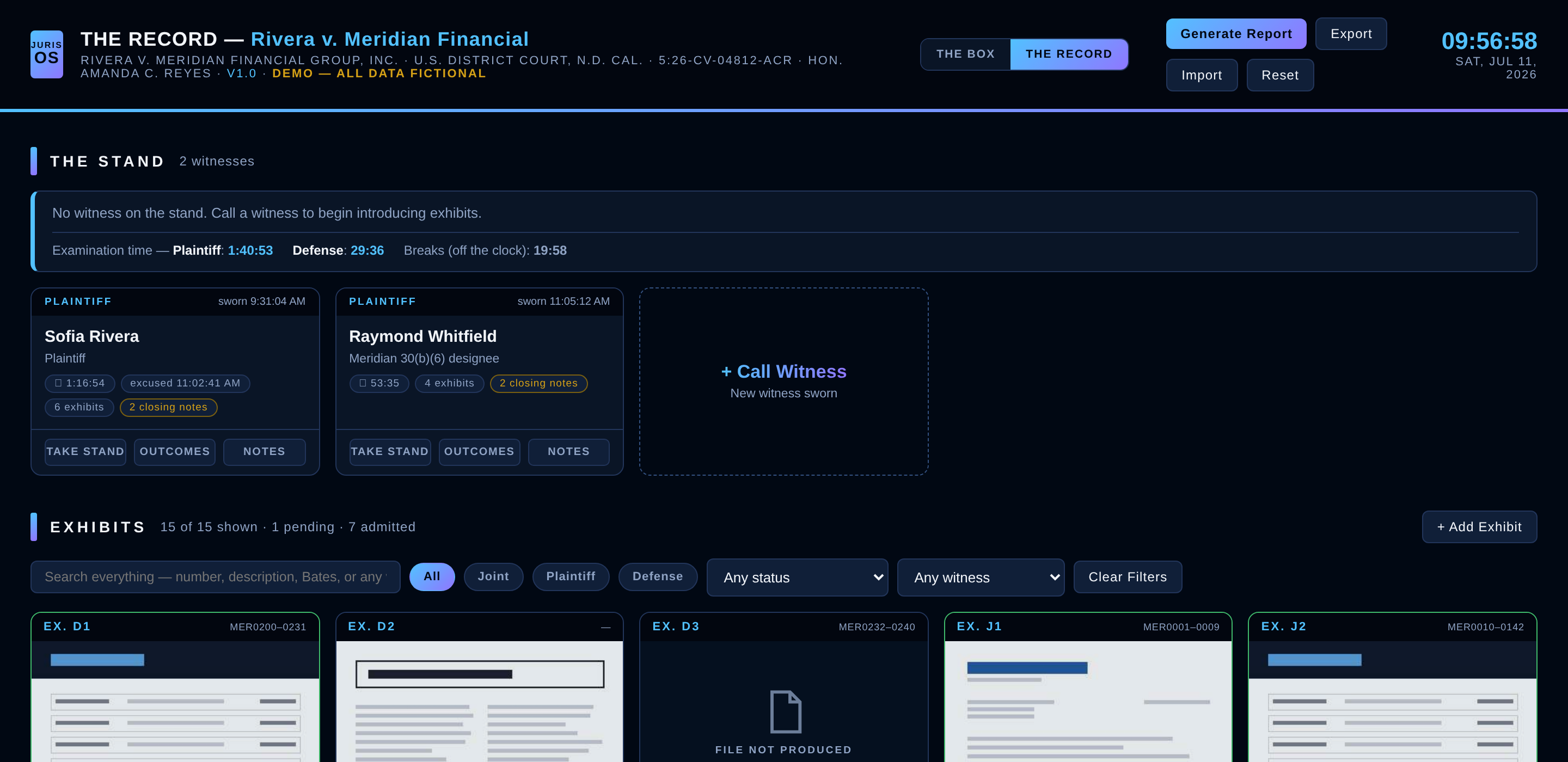
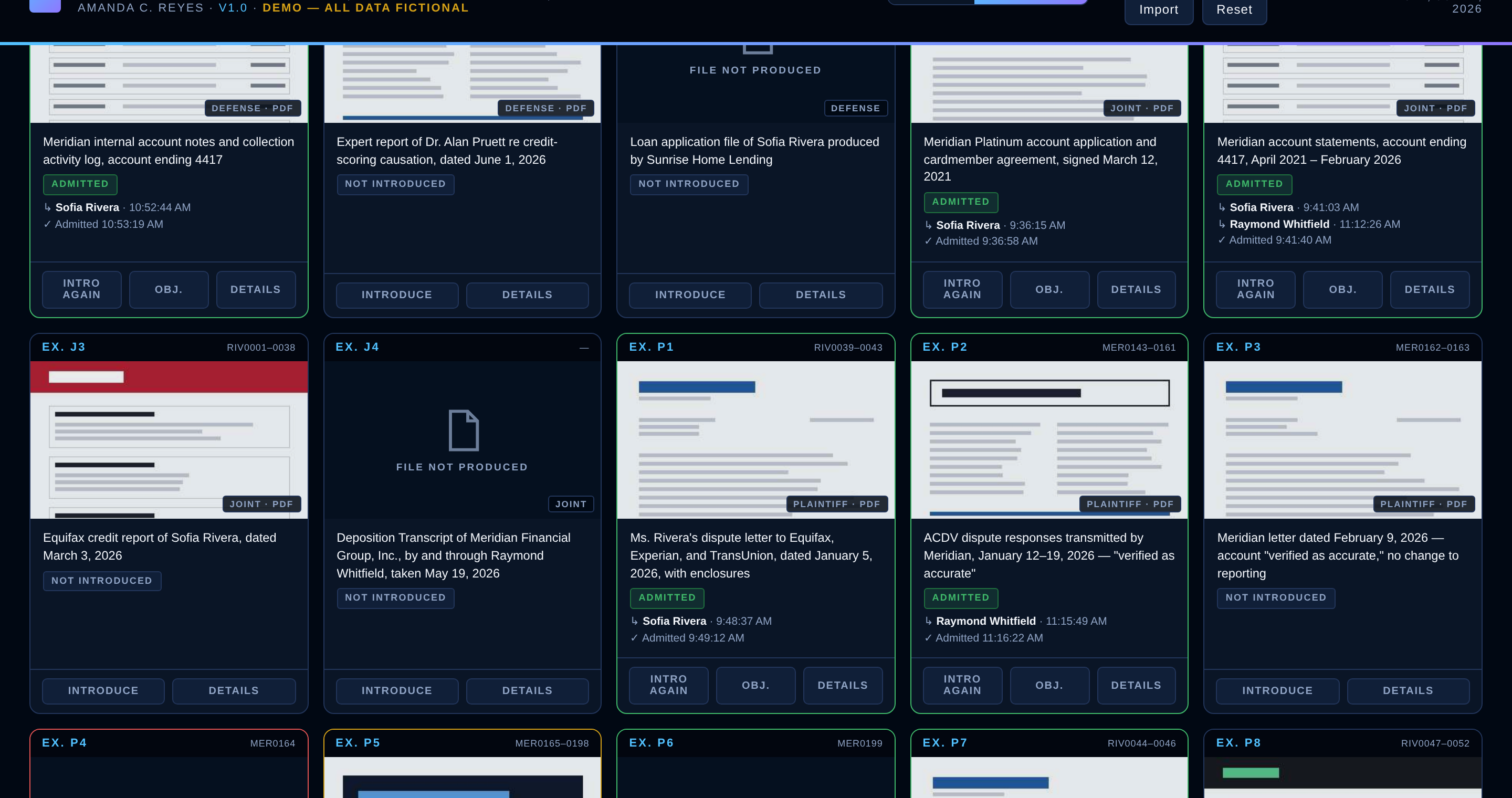
Your Exhibit List, As A Board
Upload the exhibit list and the exhibits: every exhibit becomes a card — numbered from your list, with a preview image of the actual document, its Bates range, and its live status. Introduce an exhibit through the witness on the stand and it's stamped to the second; green means admitted, red means excluded, gold means an objection is waiting on a ruling. Exhibits can come in through multiple witnesses, and the board tracks every introduction.
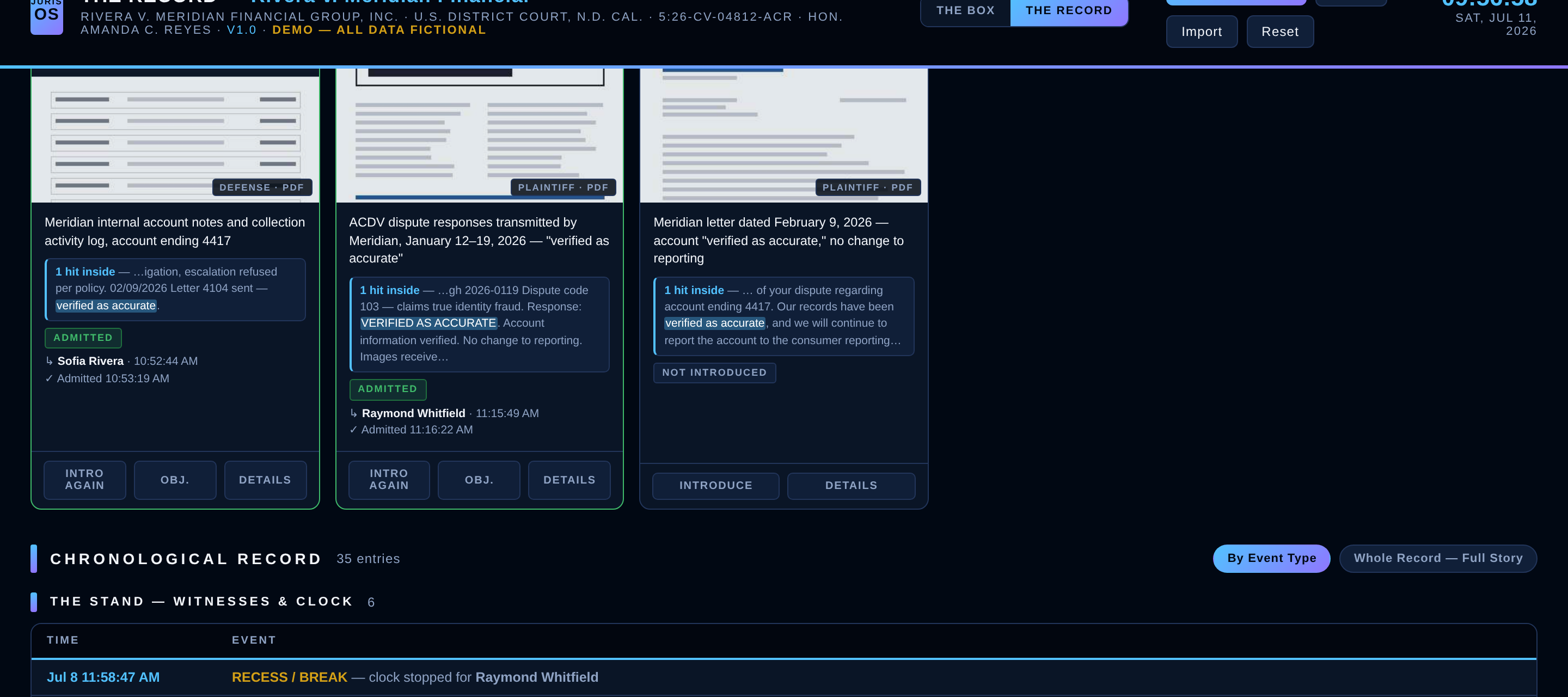
Search Inside Every Exhibit
Can't remember which exhibit has the phrase you need? The full text of every exhibit is baked into the board — including scanned documents, which are OCR'd — so one search finds every exhibit containing your words, with hit counts and highlighted snippets right on the cards. Mid-cross, "verified as accurate" is three keystrokes away from the document that says it.
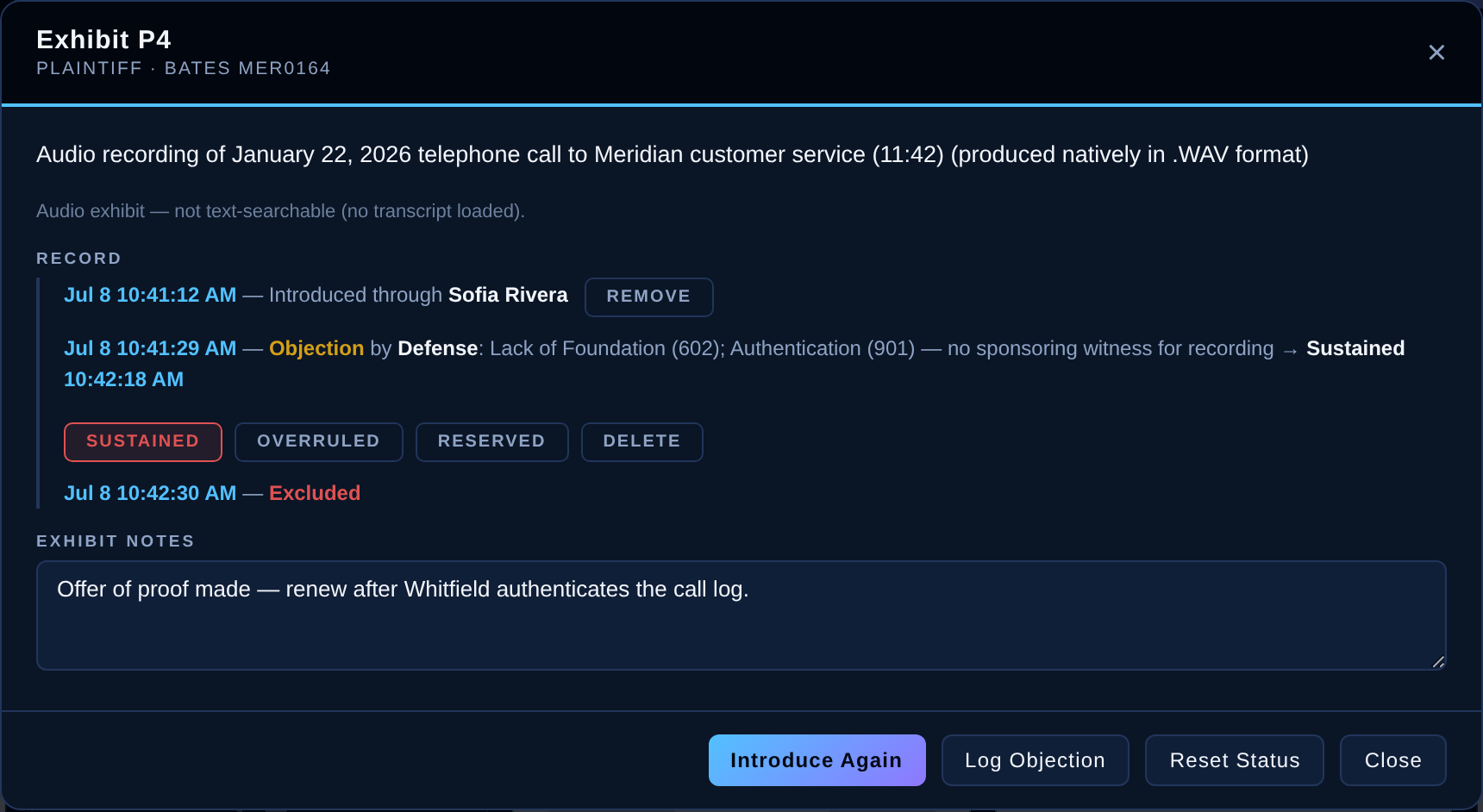
Objections Preserved, Rulings Captured
An objection not asserted is waived — so The Record makes asserting it effortless. Log the objecting party and grounds in two taps, then rule it Sustained, Overruled, or Reserved right from the card the moment the court speaks. Every exhibit keeps a complete timeline — every introduction, every objection, every ruling, every disposition, time-stamped — and any correction is logged on the record too.
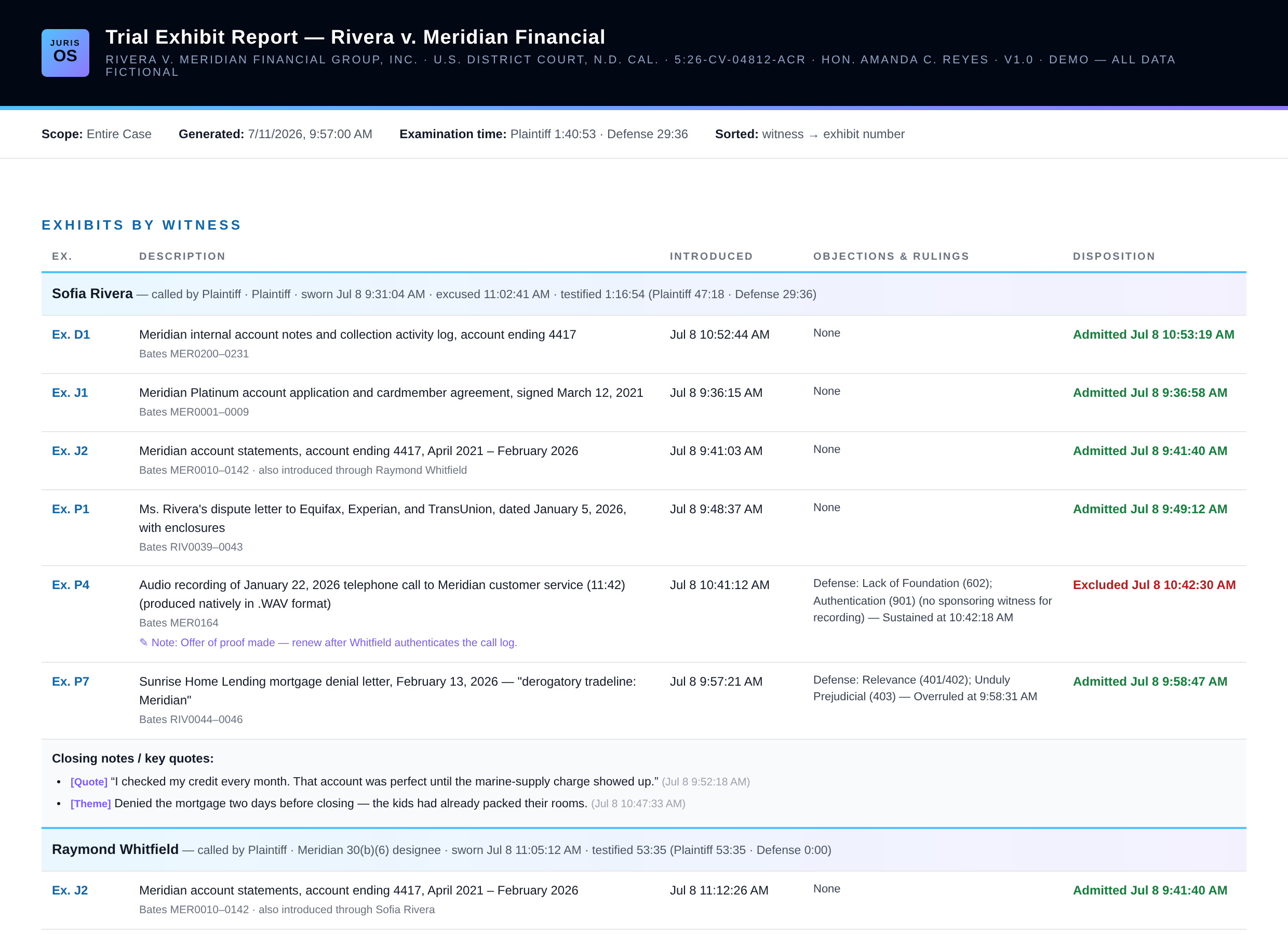
The Report Writes Itself
At any recess, generate a branded exhibit report — by witness, by several witnesses, or the whole case — sorted by witness then exhibit number, with introduction times, objections and rulings, dispositions, your closing notes, and per-witness examination time. Print it, save it as a PDF, or export CSV for Excel.
The Charge.
Every instruction. Every ruling. As the judge speaks.
The Charge is JurisOS's jury-instruction dashboard: your proposed instructions as a living set, the charge conference tracked ruling by ruling, and the judge's edits captured in real time — original text preserved. All case data below is fictional.
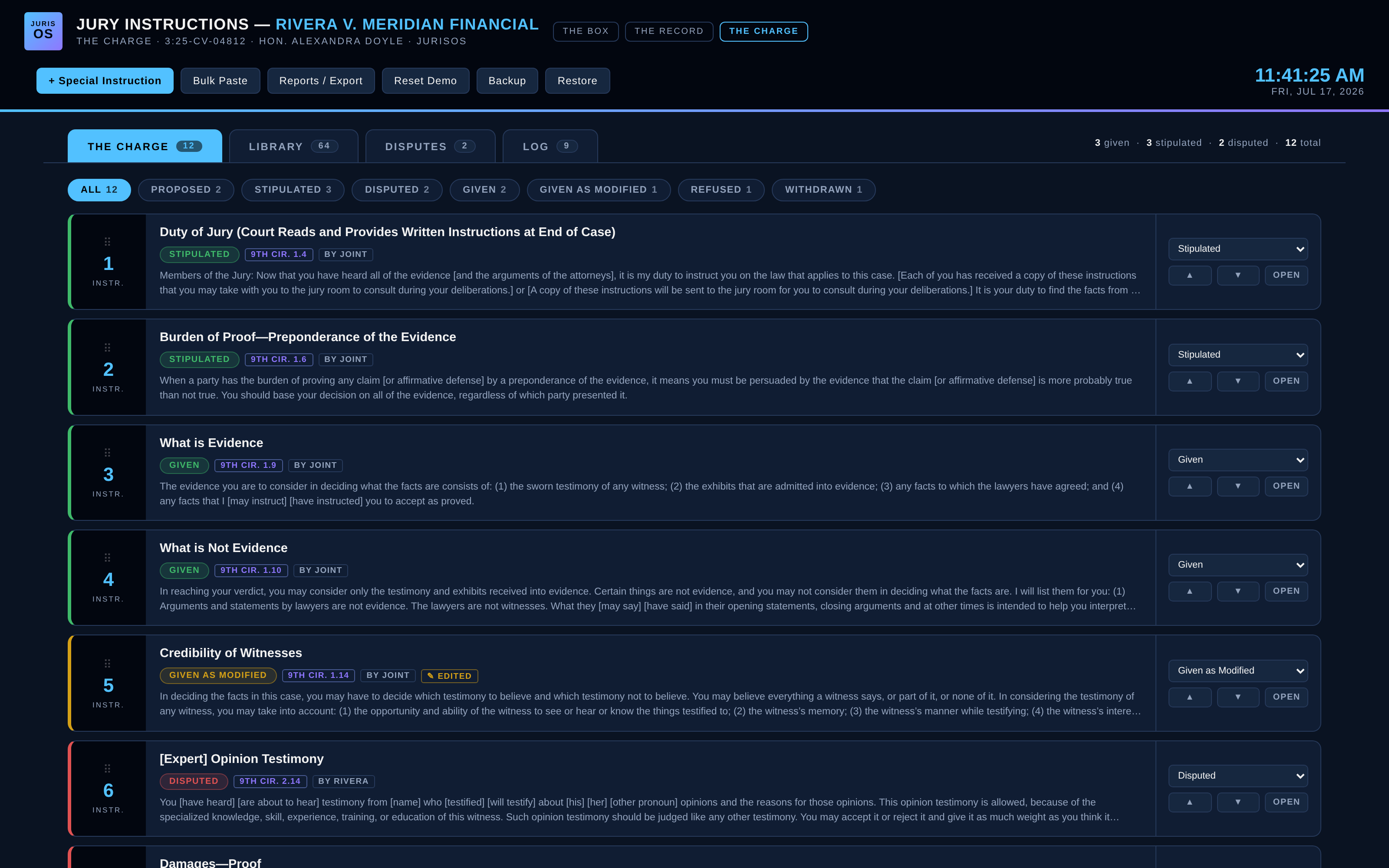
Your Instruction Set, Live
The model libraries are already inside — Ninth Circuit Model Civil instructions and CACI, verbatim — plus your special instructions, added one at a time or bulk-pasted. Every instruction carries a live status: Proposed, Stipulated, Disputed, Given, Given as Modified, Refused, or Withdrawn — and the set renumbers itself as you drag instructions into the order the jury will hear.
The Judge Edits. You Keep Both.
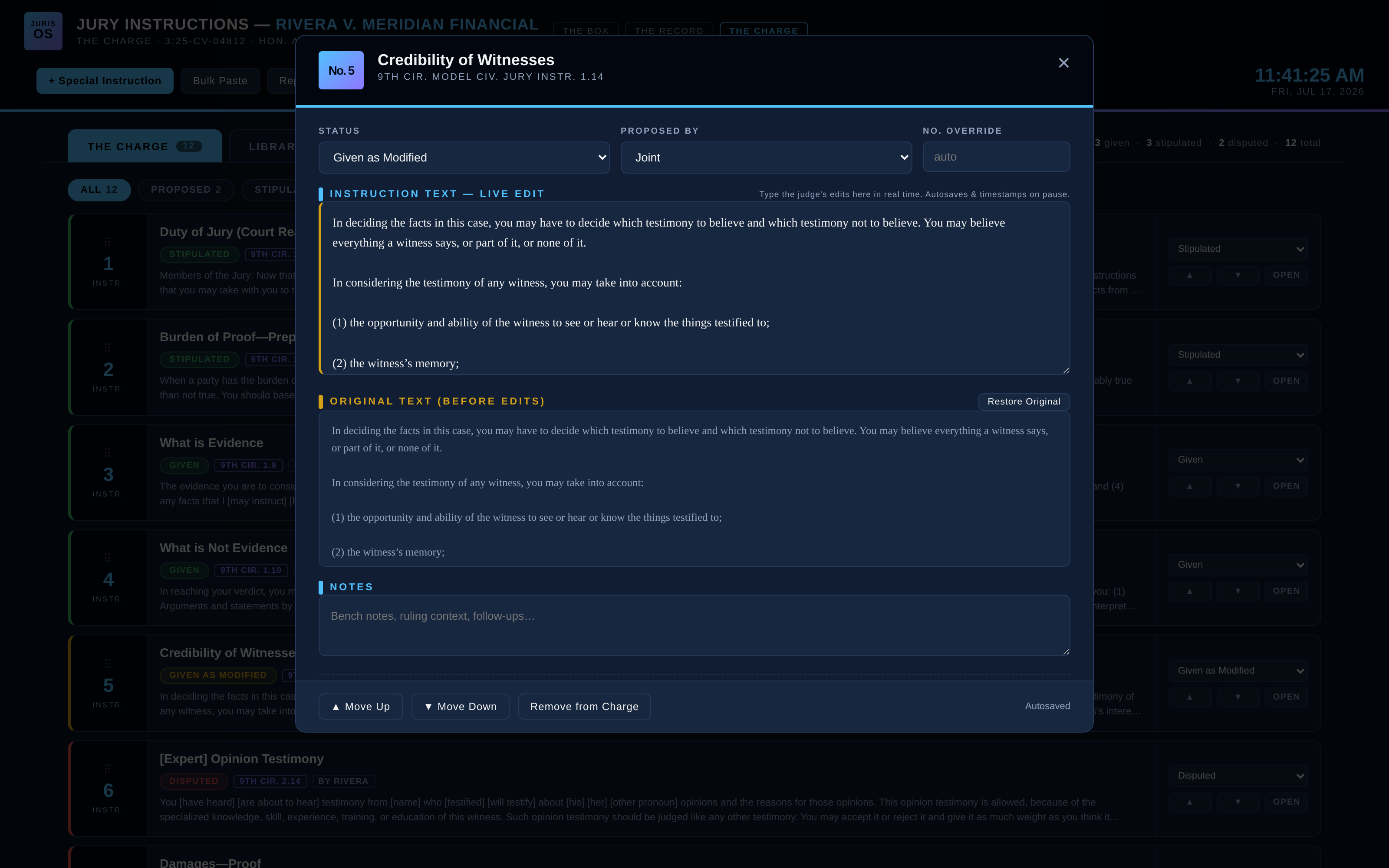
When the court rewrites an instruction from the bench, you type the edits as they're spoken — autosaved and timestamped as you go. The original text stays preserved beside the edited version, the instruction wears an EDITED badge, and one click restores the original. No more deciphering scribbles in the margin of a printed set.
Disputes, Argued And Ready
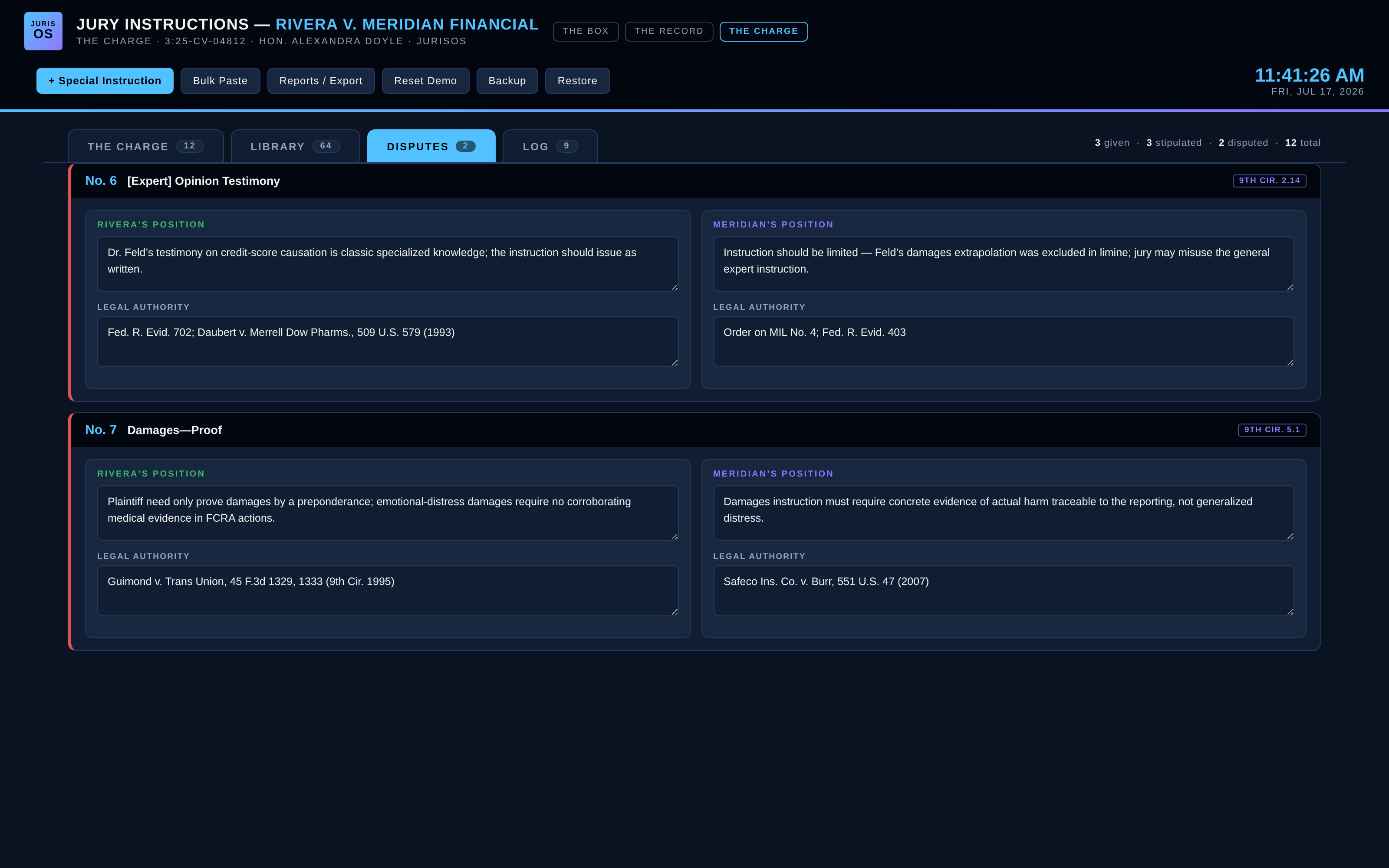
Every disputed instruction carries each side's position and legal authority, side by side. When the court reaches it at the charge conference, your argument and your cases are already on screen — and so is theirs.
The Court Copy, Clean
Judges want the final instructions with no firm branding anywhere — so The Charge prints a plain court copy: serif, unbranded, one instruction per page, ready to file. Your working copies stay branded: the full instruction set, a disputed-instructions report for the charge conference, and a to-the-second chronology of every ruling and edit.
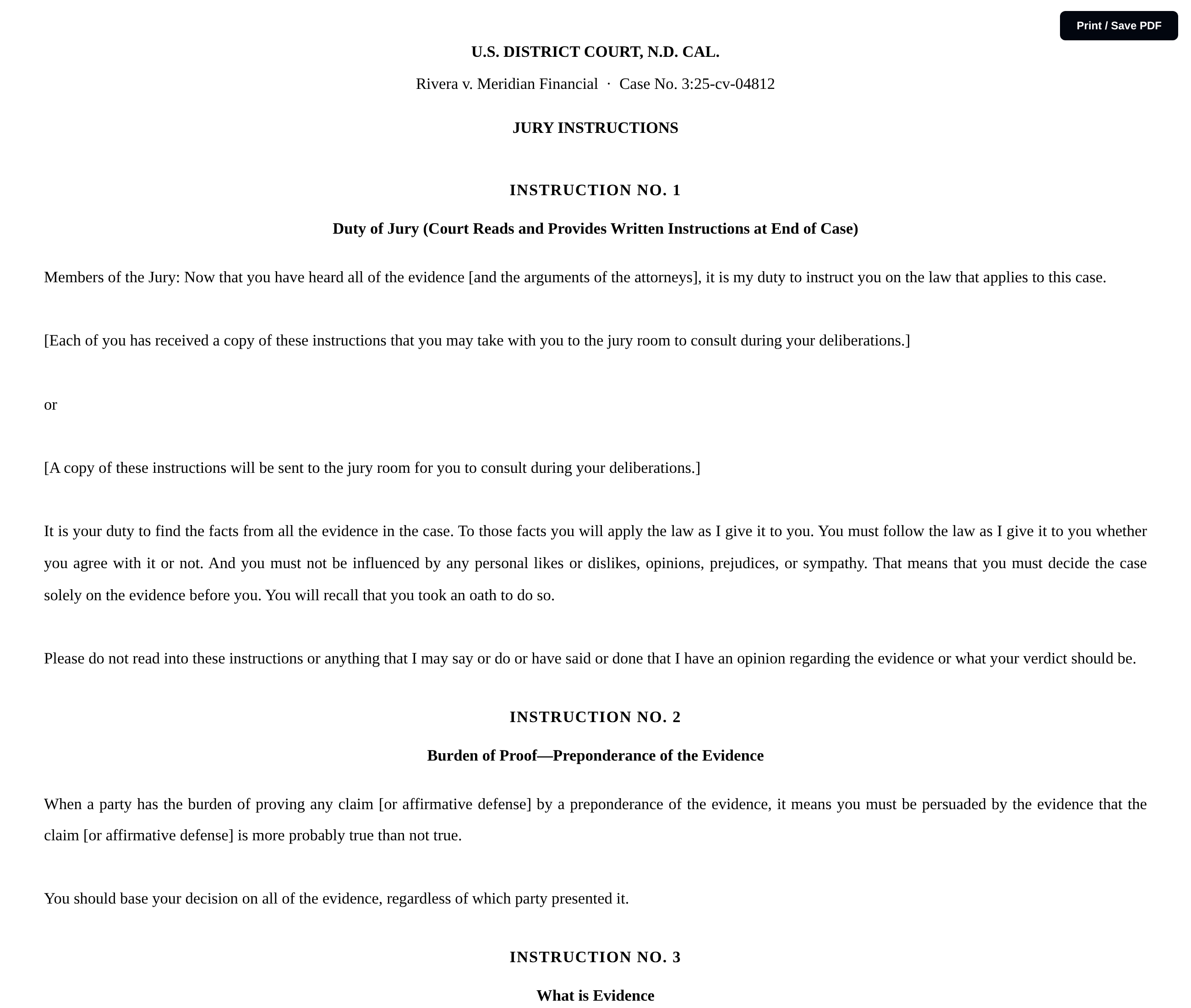
The Verdict.
Every question. Every exhibit. Proof-mapped.
The Verdict is JurisOS's closing companion: the special verdict form parsed into questions, each linked to the exhibits that prove it and the instructions that explain it — with live status pulled from The Record and The Charge. All case data below is fictional.
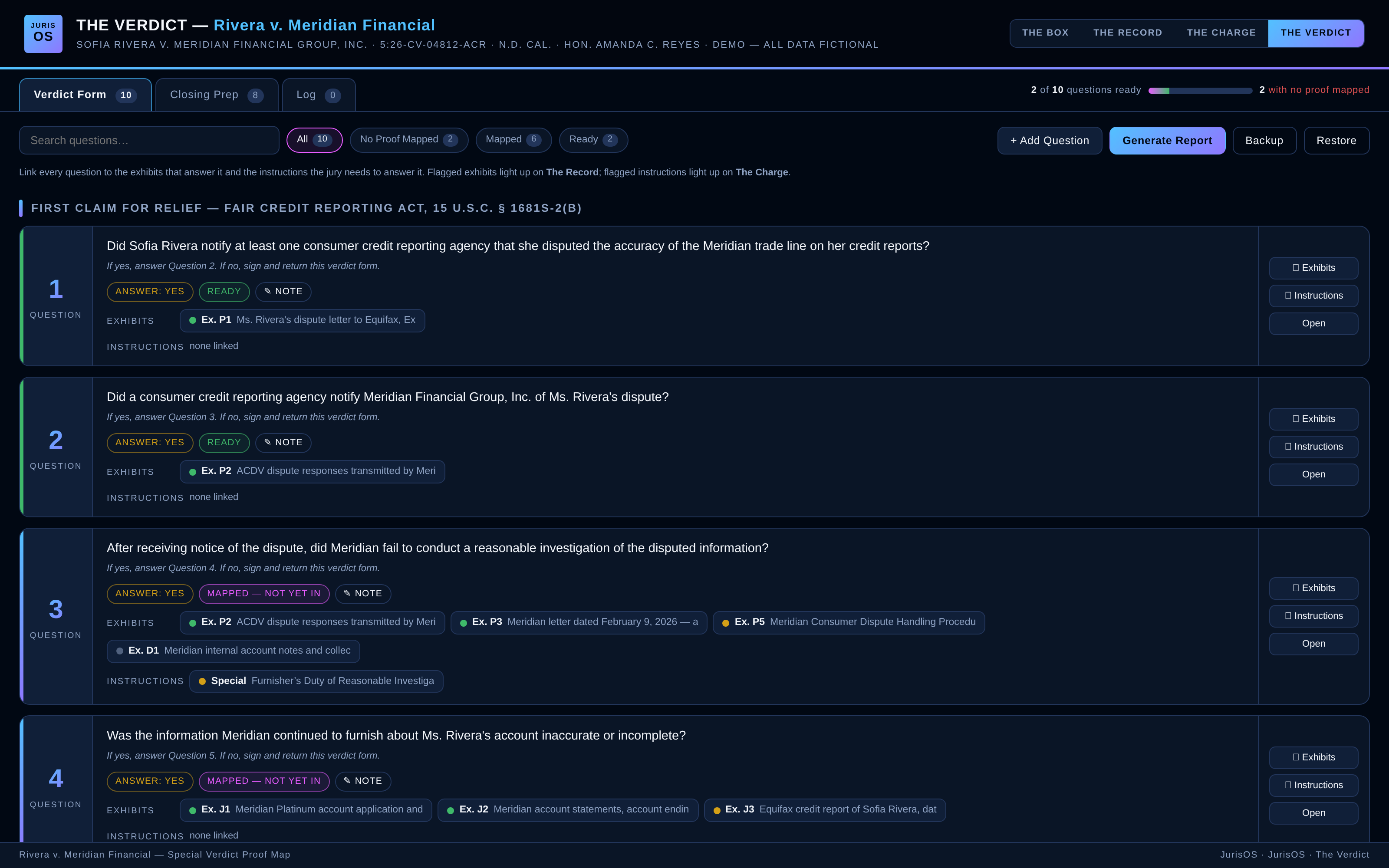
Your Verdict Form, As A Proof Map
Every question on the form becomes a card: the answer you need, the routing instruction, and the proof mapped to it. Coverage is graded live — no proof mapped, mapped but not yet in, or ready — so at any moment of trial you know exactly which verdict questions your evidence hasn't reached yet.
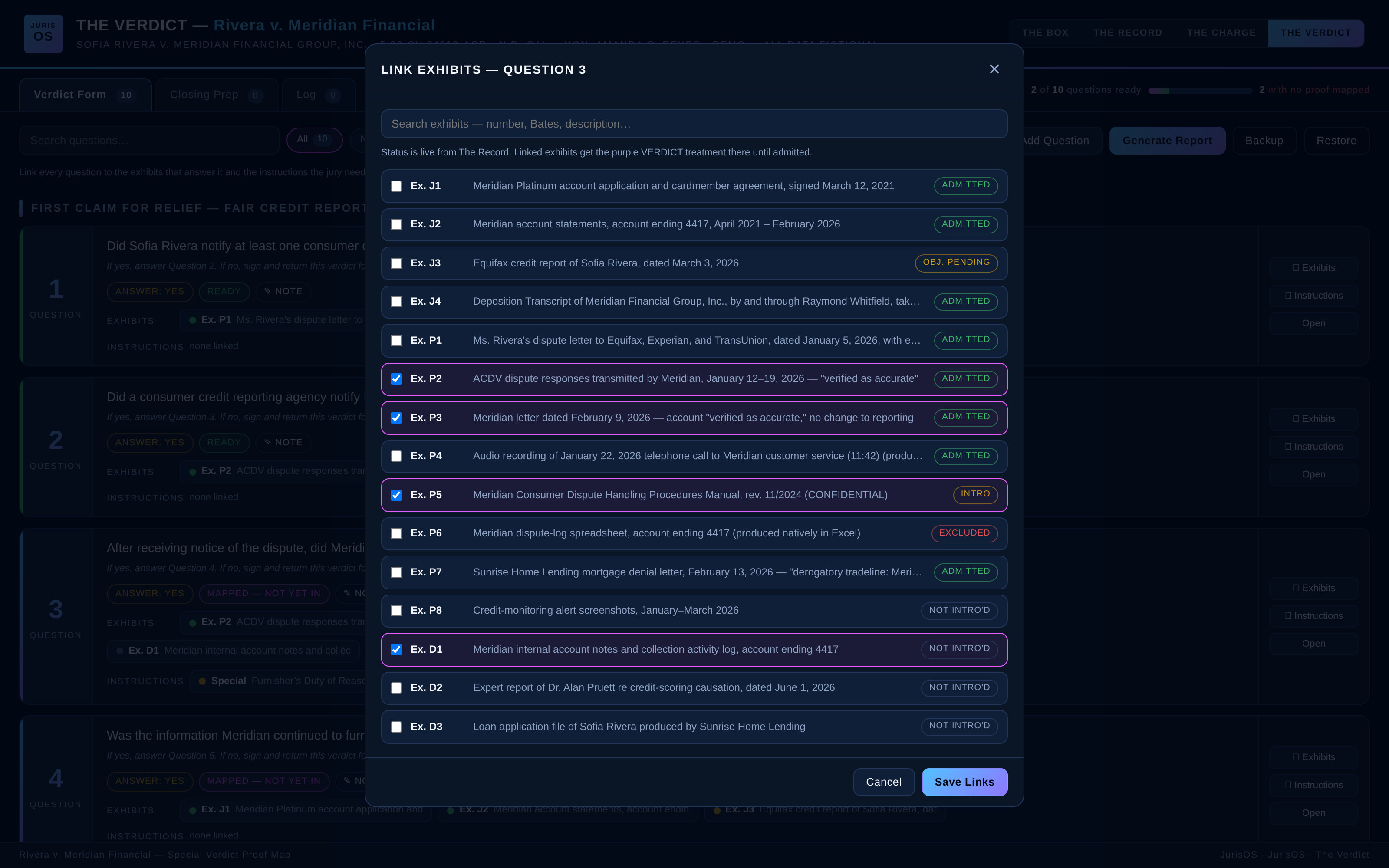
Link The Proof In Two Clicks
Open any question and check off the exhibits that answer it — each one showing its live status straight from The Record: admitted, objection pending, excluded, or not yet introduced. Link the jury instructions the same way, live from The Charge. Flagged exhibits and instructions light up on their own dashboards until they're in.
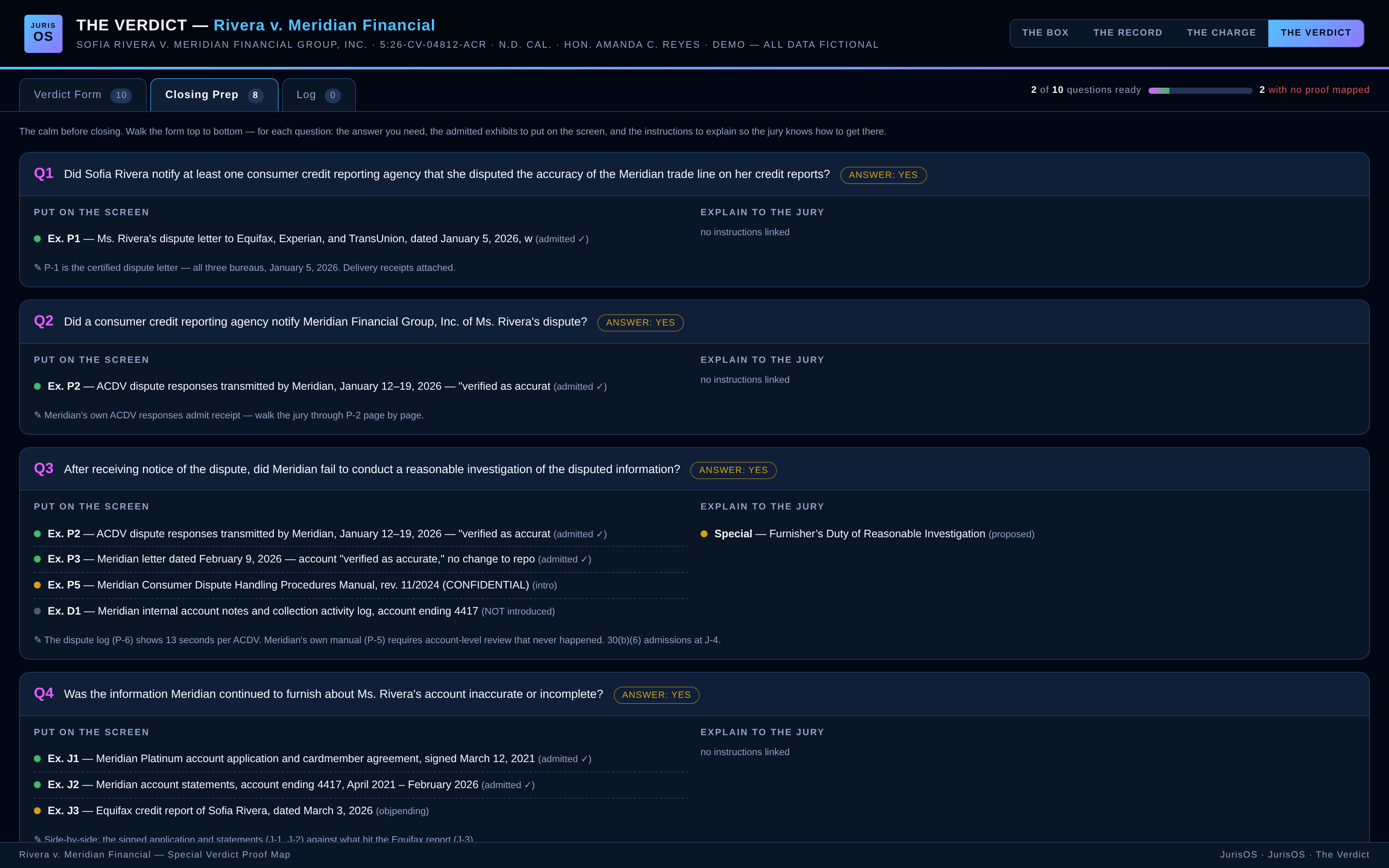
Closing Prep Mode
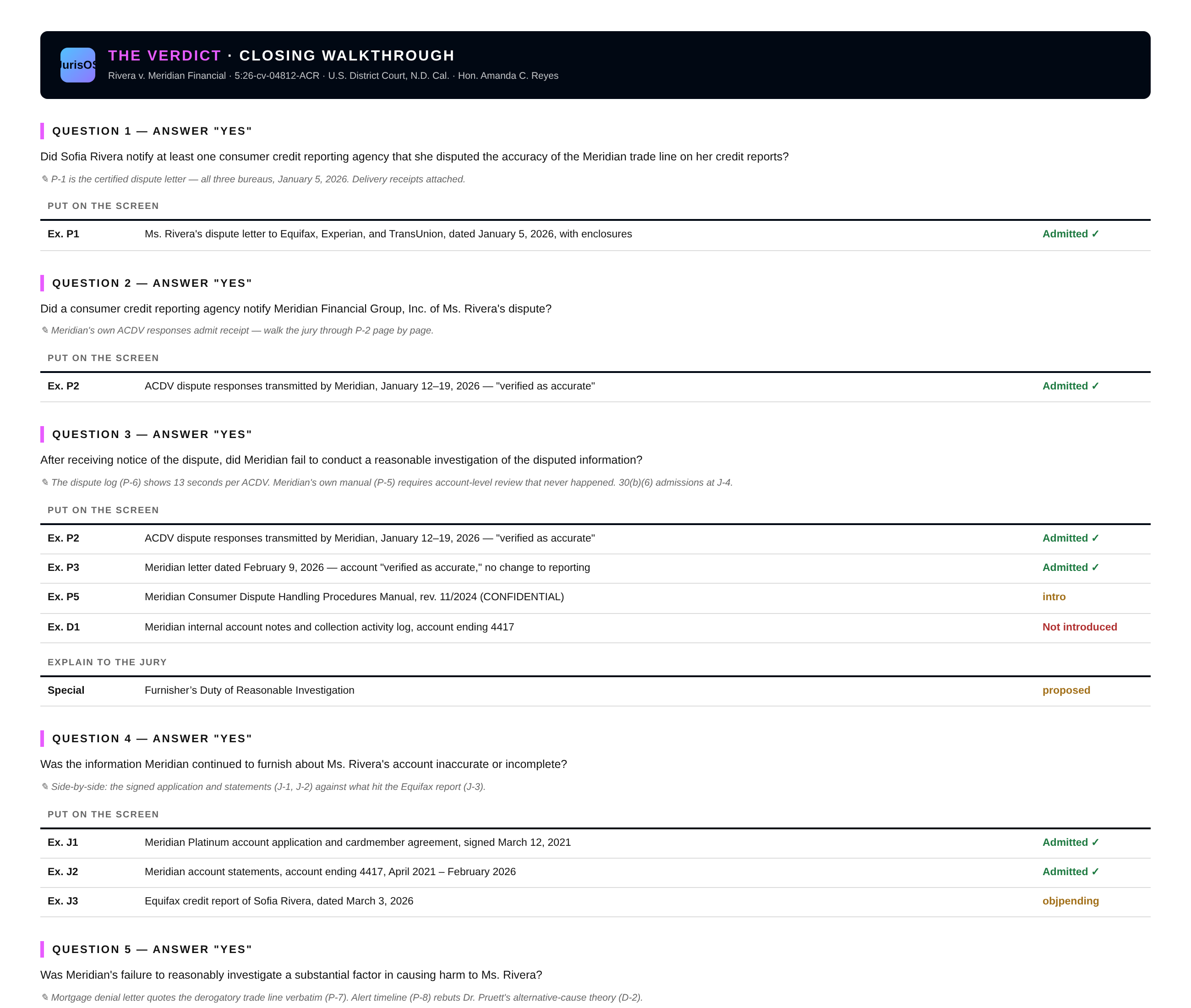
The calm before closing. Walk the form top to bottom — for each question: the answer you're asking for, the admitted exhibits to put on the screen, and the instructions to explain so the jury knows how to get there. Your trial notes ride along on every question.
The Closing Walkthrough
One click generates the closing walkthrough — your argument's skeleton, question by question, with the answer you need, the exhibits to display, and the instructions to explain. Print it, save it as a PDF, and walk to the lectern with the verdict form already argued.
One Trial, One Site
Running more than one product? They live on one matter site with a single click between them — the whole pyramid in every header: The Plan for the week before, The Box for the morning you pick the jury, The Record for every witness after, The Charge for the conference, The Verdict for closing. Same login, same screen, no juggling websites in front of the judge. Every dashboard works offline at counsel table and syncs live between co-counsel when connected.
Completely Customizable
Every dashboard is built for your case and your firm — your caption, your court's rules, your party labels (state, federal, or arbitration), your firm's colors. If you want it in there, it goes in there.
Want To Drive It Yourself?
The screenshots are the tour — the live demo is the test drive. Call or email and we'll run a mock jury selection, a mock examination, and a mock charge conference together on live dashboards, with all-fictional data. Video walkthroughs are also in production.
Not just trial-ready.
Trial-proven.
JurisOS isn't a demo reel. The founder runs the full system at counsel table — its first complete deployment in a federal jury trial ended in a seven-figure verdict, and its first state-court outing added a second jury win the very next month.
Solmaz Dehcheshmeh, a Bay Area small-business owner, was inadvertently added to a $1 million-plus mortgage she never agreed to and never signed. BMO admitted the mistake within 24 hours — then verified the error as accurate and left it on her credit reports for more than seven months, even after she formally disputed it with all three credit bureaus. Her credit score fell from roughly 750 to under 600, she was denied credit sixteen times, and she was forced to shelve the flagship app her startup was built on. A Northern District of California jury awarded $4,375,000 under the Fair Credit Reporting Act and California's Consumer Credit Reporting Agencies Act.
This was the first trial run entirely on JurisOS: The Box picked the jury in the morning; The Record ran every exhibit, objection, and witness clock through verdict. The system drew compliments from the bench, the courtroom clerks — and clerks from other departments who caught a glimpse of the screen.
The Trial Team
Maria Elena McClure spent months telling anyone who would listen that the debt collector had it wrong. CKS Prime Investments, LLC furnished inaccurate and incomplete information about her accounts to the credit bureaus — and kept furnishing it even after she disputed it. A San Diego jury found that CKS knew, or should have known, its reporting was wrong, and that its violations of California's Consumer Credit Reporting Agencies Act and the Rosenthal Fair Debt Collection Practices Act were willful. The jury awarded $150,000.
Trial counsel Nick Barthel of Barthel Legal, APC and Balam Letona of the Law Office of Balam O. Letona ran the trial on JurisOS — The Box picked the jury, and The Record ran every exhibit, objection, and witness clock through verdict. It was JurisOS's first California state-court trial, and its second jury win in as many months.
The Trial Team
Your Verdict Belongs Here
Tried a case on JurisOS? Send us the result and your team — every verdict logged here credits the lawyers who earned it, links their firm, and links their profiles. A running verdict tracker is on the roadmap as the log grows.
Case results depend on the unique facts and law of each matter. Past results do not guarantee or predict a similar outcome in any future case. JurisOS is trial software, not a law firm, and does not provide legal advice.
One trial.
One flat fee.
You go to trial a few times a year. You shouldn't pay for trial software every month you're not in trial.
Bundle & Save
One rule, no table: $1,000 per product — or $750 each when you take two or more.
Why No Subscription
Subscription pricing makes sense for software you use every day. Trial isn't that. JurisOS is priced like the trial tool it is: $1,000 per product, per trial — $750 each when you take two or more, which makes the full pyramid $3,750 — paid once, for the trial you're actually in. When your next trial comes, we build your next dashboard.
Every dashboard is prepared for your specific case — caption, court, jurisdiction rules, exhibit list, questionnaires if you have them — and delivered ready to open at counsel table, no install and no account.